Business Tri Fold Brochure Template for Professional Print Projects
Creating a compelling tri-fold brochure is more than just laying out text and images—it’s about making an impression. The Business Tri Fold Brochure Template is a powerful design tool that helps professionals present their message clearly, attractively, and effectively. Whether you're launching a new product, promoting your services, or sharing company information at an event, this template provides the structure and flexibility needed to craft a polished, impactful print piece.
Visual Characteristics and Design Appeal
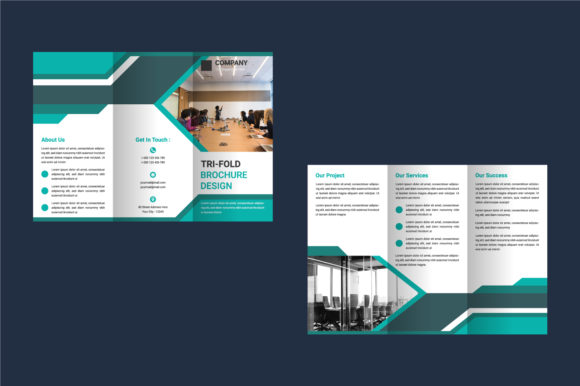
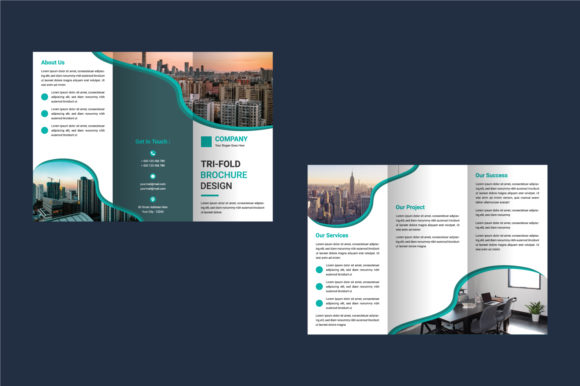
The Business Tri Fold Brochure Template is designed with clarity and professionalism in mind. It features a clean layout that divides content into three distinct panels, allowing for organized storytelling while maintaining visual flow. The use of CMYK color mode ensures accurate color reproduction when printed, which is essential for brand consistency and high-quality results.
With a resolution of 300 DPI, the template is optimized for professional printing, preventing blurry or pixelated visuals. The included file formats—Illustrator EPS and JPG—offer both scalability and compatibility across various platforms and software. These assets make it easy to adjust dimensions, rebrand elements, or integrate custom graphics without compromising quality.
While the template does not include images (❌ Images Not Included), it's structured to guide you on where to place them strategically. This allows for creative freedom while ensuring that your final product maintains a cohesive and balanced look.
What Makes It Stand Out?
One standout feature of the Business Tri Fold Brochure Template is its 100% vector composition, which means all text and shapes are fully editable and scalable. You won’t have to worry about low-resolution graphics or distorted fonts when resizing. Additionally, the use of free fonts within the template makes customization accessible even for those working with tight budgets.
The design leans toward a modern typography aesthetic, combining sleek lines and smart spacing to enhance readability. Its neutral palette and structured layout give it a versatile personality, suitable for industries ranging from finance to fashion, technology to tourism.
Where to Use This Template
This template is ideal for a wide range of business needs. Here are some common applications:
- Marketing Collateral: Perfect for product launches, service offerings, or promotional events.
- Event Promotion: Great for conferences, workshops, or trade show materials.
- Company Profiles: Use it to showcase your team, mission, and values in a compact format.
- Portfolio Presentations: Highlight your work or client projects with a visually engaging layout.
- Real Estate Listings: Present property details professionally and attractively.
- Nonprofit Organizations: Share your cause, goals, and impact through a well-structured tri-fold.
If you're involved in editorial design, such as creating brochures for magazines or catalogs, this template can help streamline the process. Similarly, if you're working on packaging design or brand identity collateral, the tri-fold format is a natural extension of your visual language.
Designing for Print and Digital Versatility
Although primarily intended for print, the Business Tri Fold Brochure Template can be adapted for digital use. Convert it into PDFs for email campaigns, embed it in websites using HTML, or repurpose key sections for social media graphics. The adaptability of the template ensures that your message reaches your audience across multiple channels with consistent branding.
For web designers and marketers, having a high-quality printable asset also means you can create QR codes linking to online versions or interactive digital brochures. The combination of physical and digital presence enhances your outreach strategy and supports multi-channel marketing efforts.
Choosing the Right Fonts and Typography
Typography plays a critical role in how your brochure is perceived. The template uses commercial fonts that are both stylish and functional. These fonts are selected to maintain legibility at different sizes while complementing the overall modern tone of the design.
When evaluating font choices, consider whether they align with your brand identity. A serif font might add a touch of elegance for traditional industries like law or real estate, while a sans serif font can convey innovation and simplicity for tech startups or modern retail brands. If you're looking to make a bold statement, a creative font or script font can be used sparingly for headlines or logos.
Here are some tips for choosing and pairing fonts effectively:
- Stick to two or three typefaces maximum to avoid clutter.
- Use one font for headings and another for body text to establish hierarchy.
- Test your chosen fonts on screen and in print to ensure they remain readable.
- Consider commercial licensing if you plan to use the font in large-scale print runs or online advertising.
Font Pairings That Work
For the best results, pair your headline font with a complementary body font. For example, if your template uses a premium font with strong display characteristics, balance it with a clean, minimalist sans serif for body copy. This contrast keeps your design interesting while maintaining readability.
Some recommended combinations based on the template’s style include:
- Display Font + Sans Serif: Bold title with clear, modern body text.
- Handwritten Font + Serif: Friendly, approachable headers with classic, readable body copy.
- Script Font + Display Font: Elegant and dynamic for luxury or creative industries.
Remember, the goal is to guide your reader through the content effortlessly. Strong visual hierarchy achieved through thoughtful font pairing will help emphasize key messages and improve engagement.
Customization Tips and Support
Thanks to its easy-to-edit nature, the Business Tri Fold Brochure Template is a favorite among small business owners, entrepreneurs, and independent creatives who want full control over their design. However, if you’re not familiar with Adobe Illustrator or need help tailoring the template to specific requirements, don’t hesitate to reach out. Customizing templates can sometimes be tricky, especially when dealing with complex layouts or brand guidelines, but assistance is available to ensure your final output looks exactly as intended.
Some practical steps for customization include:
- Replacing placeholder text with your actual content.
- Updating brand colors to match your identity.
- Adding your logo and other design assets in appropriate locations.
- Adjusting panel sizes if your project requires a different folding format.
Keep in mind that while the template includes free fonts, you may want to invest in a premium font for your logo or key headlines if you’re aiming for a more distinctive or professional look. Many premium fonts offer additional weights and styles, giving you more flexibility in logo design and editorial design.
Readability Considerations
Even with a beautiful layout, poor readability can undermine your message. Ensure that your font choices are appropriate for the content being presented. For instance, avoid using overly decorative or handwritten fonts for body text unless absolutely necessary. Instead, reserve these for accents or highlights.
Also pay attention to line spacing, font size, and contrast levels. A well-structured tri-fold brochure should allow readers to skim through content easily and find what they need quickly. This is especially important for marketing and branding materials where time is often limited.
Real-World Examples and Practical Applications
Let’s say you’re a local bakery planning a grand opening. The Business Tri Fold Brochure Template could serve as a menu and event flyer combined. Place your logo and name prominently on the front panel, highlight featured items in the center, and include contact info and hours on the back.
Or imagine you’re a freelance designer showcasing your portfolio. The tri-fold format gives you space to introduce your services on the first panel, display case studies in the middle, and end with testimonials and a call to action. Using the provided design assets, you can maintain a cohesive style throughout your presentation.
In the corporate world, a financial advisor might use this template to distribute a client summary during meetings. The structured layout ensures that data-heavy information is broken down into digestible sections, enhancing understanding and trust.
When to Ask for Help
If you’re unsure about how to modify the template or run into technical issues, support is available. From adjusting the resolution to troubleshooting color profiles, getting expert guidance can save you time and frustration. Don’t hesitate to reach out if you need special customizations—whether it’s adding a unique icon set, integrating a specific brand color scheme, or optimizing for a particular printer.
Support is especially valuable if you're new to design tools like Illustrator or need to meet strict printing specifications. Even seasoned designers occasionally benefit from a second opinion to refine the final output before going to press.
Why Brand Consistency Matters
A tri-fold brochure isn’t just a handout—it’s part of your brand identity. Every element, from the font choice to the layout and color usage, contributes to how your business is perceived. The Business Tri Fold Brochure Template encourages consistency by providing a ready-made framework that mirrors your brand’s voice and visual language.
Using the same fonts and colors across all marketing materials—from your website to social media posts and print collateral—helps build brand recognition. Customers start to associate these visual cues with your company, making your brand more memorable and trustworthy.
Moreover, the template’s CMYK readiness and 300 DPI resolution mean your printed materials will reflect the same quality and detail as your digital ones. This level of professionalism can make a big difference in customer perception, especially in competitive markets.
Final Thoughts on Usability and Value
The Business Tri Fold Brochure Template is more than just a layout—it’s a foundation for effective communication. By leveraging its customizable design, high-resolution files, and professional formatting, you can produce brochures that look great, function well, and support your broader marketing strategy.
Its user-friendly structure makes it a go-to option for anyone who wants to create a tri-fold without starting from scratch. Whether you’re a marketer crafting sales materials, a blogger compiling a resource guide, or a small business owner preparing for an upcoming launch, this template gives you the tools to stand out without sacrificing quality.
Take advantage of the included design assets and think carefully about how each section tells your story. With the right approach, your tri-fold brochure becomes more than just a piece of paper—it becomes a powerful ambassador for your brand.