Easter Marketing Board for Photography Sessions
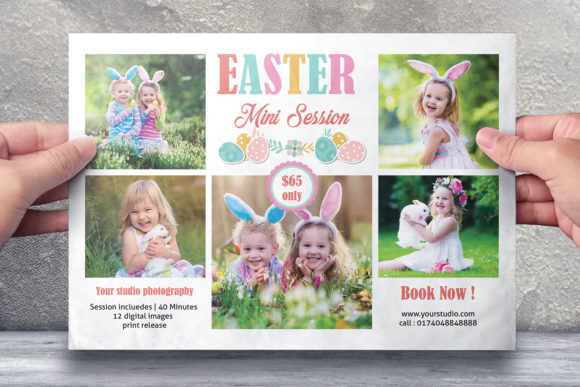
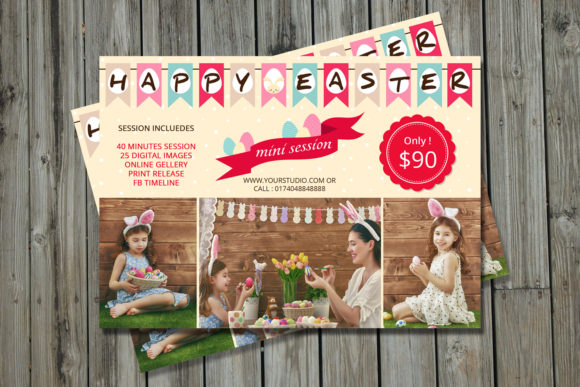
The Easter Photography Marketing Board is a specialized design template created to help photographers and content creators promote their Easter mini sessions effectively. Whether you're a professional photographer or just starting out, this board provides a structured visual layout that can be used for social media posts, print materials, or digital marketing campaigns. The template is designed with practicality in mind, making it easy to customize while maintaining a high-quality, professional appearance.
What Makes This Template Unique?
This particular template comes in two file formats: Photoshop (PSD) and Adobe Photoshop Elements, ensuring compatibility across different software versions. It includes all the necessary layers for editing text and images separately, which is especially useful when tailoring your message to specific audiences. Smart Objects are used throughout the design, allowing users to easily swap out photos without compromising resolution or quality. The template also features detailed help files, including download links for fonts and instructions on how to replace images or adjust colors.
With a size of 7x5 inches, one-sided layout, 300 dpi resolution, and CMYK color mode, it’s ideal for both digital sharing and print-ready materials. The bleed setting of 0.25 inches ensures clean edges if printed professionally. Two PSD files are included—one for the working version and another for final output—giving you flexibility during the design process.
Beginners Looking to Simplify Their Workflow
For those new to photography marketing or Adobe software, this template offers an accessible way to create visually appealing promotional materials without needing advanced design skills. You don’t have to start from scratch; instead, you can focus on replacing the placeholder text and image to reflect your brand. For example, a beginner could use the board to promote their first Easter mini session to friends, family, and local clients by simply updating contact details and pricing.
Experienced Photographers Seeking Efficiency
Professionals who already have an established workflow might value the speed and reliability of this template. Since it's built using smart objects and layered components, it allows for quick updates without affecting the overall design integrity. An experienced user might leverage this to create multiple variations of the same board for different platforms like Instagram, Facebook, or email newsletters, saving time while maintaining consistency in branding.
Entrepreneurs and Small Business Owners Focused on Branding
Small business owners often need cohesive visuals across all their marketing channels. This Easter template helps maintain brand consistency through its organized layer structure and font suggestions. By customizing the template with their logo, brand colors, and unique selling points, they can create a unified look that builds trust and recognition. For instance, a boutique studio could use the board to launch a seasonal campaign that aligns with their spring promotions and customer engagement strategies.
Bloggers and Content Creators Aiming for Visual Appeal
If you run a photography blog or YouTube channel, the Easter Marketing Board can serve as a backdrop for tutorials, reviews, or behind-the-scenes content. Its clean design makes it easy to overlay callouts or tips about capturing Easter themes, such as pastel tones, floral backdrops, or family portraits. Bloggers may appreciate the ease of embedding the board into their website headers or social media stories for a polished aesthetic.
Marketing Teams Wanting Creative Flexibility
Marketing teams often juggle multiple projects at once, so having a reliable template can streamline their efforts. They can use the Easter Marketing Board to create promotional banners, flyers, or even slide decks for client presentations. The flexibility to change fonts, colors, and imagery means the template can adapt to various brands or campaigns. A team promoting a community event might use it to highlight session dates, locations, and special offers tailored to families.
Photography Educators Sharing Knowledge Visually
For educators teaching photography or graphic design, this template can be a valuable classroom tool. It demonstrates how to organize a design project using layers, smart objects, and color modes suitable for print. Students can practice modifying the template to understand real-world applications of design principles. An instructor might walk students through changing the photo in the template or adjusting the layout for mobile versus desktop views.
Key Features and How to Use Them
- Smart Object Layers: Easily replace the existing photo with your own without distorting the design. Just navigate to the "Photo" folder within the layers panel and double-click the smart object to edit.
- Customizable Text: All text elements are editable using the Text Tool. If you want to change the font, the help file includes a direct download link for the recommended typeface.
- Print and Digital Ready: The 300 dpi resolution and CMYK color settings make it suitable for printing, while the compact 7x5 inch size is perfect for digital ads and social media graphics.
- Two File Versions: The working file allows for full customization, while the second file is optimized for final output, ensuring everything looks sharp and consistent across mediums.
Promoting an Easter Mini Session Online
A freelance photographer could use the board as the main visual for a post on their Instagram feed or Pinterest page. By swapping in a sample Easter-themed photo, adding their booking link, and tweaking the text to include a limited-time offer, they can attract more bookings efficiently.
Creating Print Flyers for Local Events
Small business owners or studio managers might print the board as part of a flyer distribution strategy. With the proper bleed and resolution settings, the template ensures that the final product looks crisp and professional in handouts placed in cafes, schools, or community centers.
Using It for Email Campaigns
Marketers can export the design into web-friendly formats and embed it into an HTML email. The template’s clarity and simplicity help convey key information quickly, increasing the chances of recipients engaging with the session details or clicking through to a booking form.
As a Classroom Project for Design Students
Instructors can assign students to modify the template, encouraging them to experiment with layout adjustments, typography choices, and color schemes. This hands-on approach teaches practical design skills while reinforcing the importance of seasonal marketing in creative industries.
How to Decide if This Template Fits Your Needs
To determine whether the Easter Photography Marketing Board suits your goals, consider these questions:
- Do you need a ready-made template to save time on design work?
- Are you targeting clients interested in seasonal photography services?
- Will you be sharing your promotion online or in print?
- Do you require support for beginners or prefer something adaptable for pros?
If you answered yes to most of these, the template is likely a good match. However, if your needs are highly customized or involve complex animations, you might explore other options or reach out for a custom design.
Why Choose This Template Over Others?
Many templates on the market either lack flexibility or come with confusing instructions. This Easter Marketing Board stands out because it balances simplicity with functionality. Beginners can follow the included help file step-by-step, while professionals will appreciate the layered organization and smart object usage. Additionally, since it supports both Photoshop CS2 and newer versions, it’s versatile enough for a wide range of users.
Its commercial value lies in the ability to repurpose the design for various platforms. The learning value is evident in how it introduces fundamental design concepts in a real-world context. And its long-term usefulness becomes clear when you consider future holiday sessions—many of the design elements can be reused or adapted for other occasions.
Contact for Customization or Support
If you find that your specific requirements go beyond what the Easter Marketing Board offers, the creator encourages reaching out for a custom-designed solution. Personalized templates can better align with your brand identity, target audience, or niche preferences. Whether you’re looking to add extra elements like QR codes, testimonials, or interactive features, a custom build can meet those needs.
Users are also invited to leave feedback or recommend the artwork if they find it helpful. Positive reviews contribute to the visibility of such resources, helping others discover tools that suit their workflow and creativity.
Final Thoughts
Ultimately, the Easter Photography Marketing Board serves as a solid foundation for anyone wanting to showcase their Easter mini sessions with minimal effort. It respects different skill levels and use cases, offering a blend of ease, quality, and adaptability. Whether you're a hobbyist experimenting with design or a seasoned marketer optimizing for conversions, this template can enhance your promotional efforts with a professional finish.