Travel Postcard Template: A Practical Guide for Creators
In a digital world dominated by instant messaging and fleeting social media stories, the physical postcard remains a surprisingly powerful tool. It is tangible, personal, and often kept long after a trip ends or a message is delivered. For designers, small business owners, and marketers, creating high-quality travel-themed graphics is a common need. This is where a Travel Postcard Template becomes an essential asset in your workflow. Rather than starting from a blank canvas every time, these templates offer a structured foundation that balances aesthetic appeal with functional precision.
Understanding what this template actually provides—and who it serves—can save you hours of design time and ensure your final output meets professional printing standards. Whether you are a seasoned graphic designer looking to streamline client work or a hobbyist wanting to send unique updates to friends, knowing how to leverage these resources effectively is key.
What Is a Travel Postcard Template?
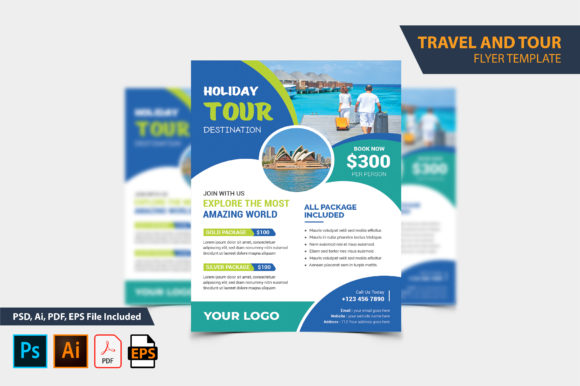
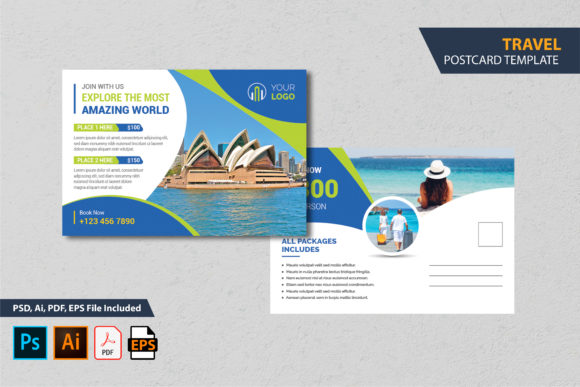
At its core, a Travel Postcard Template is a pre-designed file structure intended for creating postcards with a travel theme. Unlike a mock-up, which is primarily used to visualize how a design might look on a surface, a template is fully editable. You can change the text, swap out images, adjust colors, and modify layout elements to suit your specific project needs.
The technical specifications are critical here. A standard travel postcard template typically features dimensions of 6x4 inches with a 0.25-inch bleed. The "bleed" area ensures that when the postcard is cut at a print shop, there are no unwanted white edges. Furthermore, these files are usually provided in multiple formats, including PSD (Photoshop), AI (Illustrator), EPS, and PDF. They are set to 300 DPI (dots per inch) and CMYK color mode, which is the industry standard for high-quality commercial printing. This means the file is "print-ready," reducing the risk of color distortion or pixelation in the final product.
Why Different Audiences Care About Templates
The value of a Travel Postcard Template varies significantly depending on who is using it. It is not just about saving time; it is about accessibility, consistency, and professional quality.
For Beginners and Hobbyists
If you have never opened Adobe Photoshop or Illustrator before, designing a print-ready file from scratch can be intimidating. You might struggle with resolution settings, color profiles, or bleed margins. A well-structured template solves this by providing a guided framework. Most templates come with a "Read Me" file that acts as a step-by-step guide. This document explains exactly how to change text, replace images, and adjust colors without needing deep technical knowledge. For a hobbyist sending vacation updates, this lowers the barrier to entry, allowing them to create something that looks professionally designed without the steep learning curve.
For Freelancers and Designers
Professional designers often face tight deadlines. When a client requests a set of promotional postcards for a travel agency or a local tourism board, starting from zero is inefficient. Using a Travel Postcard Template allows designers to focus on customization rather than construction. They can quickly adapt the layout to fit brand guidelines, ensuring client satisfaction while maintaining high efficiency. The fact that the template is fully layered and editable means that even complex adjustments can be made without breaking the design integrity.
For Small Business Owners and Marketers
For entrepreneurs, cost and speed are often primary concerns. Hiring a designer for every single marketing piece can drain a small budget. By purchasing or downloading a versatile template, business owners can produce consistent, high-quality marketing materials in-house. This is particularly useful for seasonal campaigns, such as summer travel promotions or holiday greetings. The ability to edit the template repeatedly means one purchase can serve multiple years of marketing needs, offering significant long-term value.
Evaluating Key Features and Priorities
When selecting a Travel Postcard Template, it is important to look beyond the visual preview. Several practical factors determine whether a template will meet your specific goals.
- Software Compatibility: Ensure the template works with software you already own or are willing to use. Most high-quality templates require Adobe Photoshop or Illustrator, specifically versions CS through CC 2020 or later. If you only have free alternatives like GIMP or Inkscape, compatibility might be limited, so checking the requirements beforehand is crucial.
- File Variety: A robust download should include multiple file types. Having both PSD and AI files gives you flexibility depending on whether you prefer raster-based editing (pixels) or vector-based editing (scalable paths). Including EPS and PDF files adds further versatility for different printing workflows.
- Layer Structure: A "fully layered" template is a major advantage. It means every element—backgrounds, text boxes, decorative icons—is separated into its own layer. This makes it easy to hide, move, or delete components without affecting the rest of the design. Conversely, flattened templates are much harder to customize.
- Font Availability: Typography sets the tone of your postcard. Good templates include links to any free fonts used, ensuring you can replicate the design accurately. Always check if the fonts are truly free for commercial use if you plan to sell products featuring the design.
Practical Examples of Use Cases
To better understand how a Travel Postcard Template fits into real-world scenarios, consider these examples:
The Educator: A history teacher wants to create engaging handouts for a unit on ancient Rome. Instead of drawing illustrations, they use a travel-style template, replacing generic landscapes with historical sites. They add educational facts in the text areas, creating a visually appealing study aid that students enjoy keeping.
The Blogger: A travel blogger wants to expand their brand offline. They use the template to create branded postcards to include in packages sent to subscribers. By customizing the colors to match their website’s palette, they create a cohesive brand experience that encourages recipients to share photos on social media, driving more traffic back to their blog.
The Event Planner: A wedding planner designs "Save the Date" cards with a travel theme for a destination wedding. Using the template, they easily insert the couple’s names, the venue location, and the date. The professional print-ready format ensures the invitations look crisp and elegant when mailed.
Important Considerations Before Downloading
While templates are incredibly useful, there are common pitfalls to avoid. First, remember that photos and mockups shown in previews are usually for demonstration purposes only. They are not included in the main download. You will need to source your own high-resolution images that fit the travel theme. Second, always double-check the software version requirements. Trying to open a file created in a newer version of Photoshop on an older version can result in errors or missing effects.
Finally, respect copyright and licensing agreements. Even if a font is free, its usage rights may vary. Ensure you understand whether you can use the final design for personal projects, commercial clients, or resale. A clear license agreement protects both you and the original creator.
Conclusion
A Travel Postcard Template is more than just a decorative file; it is a practical tool that bridges the gap between amateur creativity and professional presentation. By understanding your own skill level and project requirements, you can choose a template that offers the right balance of ease of use and customization. Whether you are sending personal memories, promoting a business, or educating a classroom, the right template can help you communicate your message clearly and beautifully.